
Why Convert Architectural Drawings into Intelligent 3D Models
Understanding the Shift from Traditional Drafting to Smart 3D Workflows
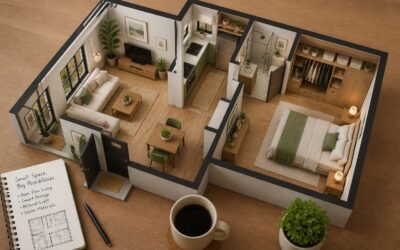
Architects in Johannesburg have spent generations convincing clients that a smudged roll of tracing paper constitutes insight. The truth is less flattering. Converting floor plans to 3d ai workflows replaces guesswork with measurable geometry, and it does not require anyone to surrender their artistic temperament.
Traditional drafting forces everyone to imagine what a room feels like from cryptic symbols and dashed lines. Smart 3D workflows let stakeholders wander through the space before a single foundation is poured. I have watched clients nod politely at 2D plans, then fully engage the moment a model rotates on screen. The difference reshapes project dynamics:
- Errors surface in the model instead of on the construction site
- Clients approve designs they can actually inspect from every angle
- Renovations begin with accurate existing data rather than faded originals
The shift from paper to intelligent models also changes communication. Quantity surveyors, structural engineers, and interior designers finally share one digital reference. Floor plans to 3d ai tools make that collaboration routine. For Cape Town firms juggling heritage buildings and coastal climate constraints, this clarity is not a luxury. It is survival.
Key Benefits for Architects, Real Estate Agents and Interior Designers
A floor plan is a language of symbols, and most clients never become fluent. Converting floor plans to 3d ai removes the translation entirely, a practice now defining competitive firms from Sandton to the V&A Waterfront.
For real estate agents, the intelligent model becomes the listing itself. Buyers inspect ceiling heights, window placement, and room proportions before a site visit. Interior designers use the same model to verify that a proposed sofa clears the door swing and that morning sun reaches the reading nook. Architects resolve spatial conflicts before tenders go out, agents qualify serious buyers before they arrive, and designers present realistic finishes without costly material samples.
- Architects resolve spatial conflicts before tenders go out
- Agents qualify serious buyers before they arrive
- Designers present realistic finishes without costly material samples
Each party works from one measurable version of the truth. That shared model, produced through floor plans to 3d ai, removes the friction that erodes project timelines and trust.
How AI Automation Reduces Manual Modeling Errors
Every manual conversion of a floor plan introduces a margin of error. A dimension misread, a wall thickness guessed, and the digital model diverges from the architect’s intent. Converting floor plans to 3d ai changes this dynamic. The AI reads the drawing as data, not as an image to be traced, and cross-checks measurement against geometry.
AI automation reduces manual modeling errors by flagging inconsistencies the human eye skips:
- a door that overlaps a column
- a stair that lands a centimetre short
- a window that punches through a structural beam
Each flag stops the mistake from propagating into later stages. A single misplaced window becomes a structural clash at tender and a costly variation order on site. I have watched this happen! For South African firms managing tight deadlines from Johannesburg to Cape Town, converting floor plans to 3d ai produces a model that is consistent, measured, and ready for the next stage. The tedious precision belongs to the machine.
Impact on Client Presentations and Stakeholder Communication
Clients do not read drawings. They read spaces. A 2D floor plan requires a leap of imagination that many stakeholders simply cannot make. Converting floor plans to 3d ai removes that cognitive barrier entirely. The investor sees the volume of the atrium. The homeowner walks through the kitchen before a single brick is laid. This translation turns a technical document into a shared vision.
The impact on stakeholder communication is immediate. When everyone views the same intelligent model, questions change from “what does this line mean” to “can we move this wall”. That shift saves hours of meeting time and prevents costly misinterpretations.
– Spatial flow becomes obvious
– Natural light is visible
– Material choices feel tangible
For South African developers managing municipal approvals and client expectations, this transparency builds trust. The model becomes the single source of truth. What you present is what gets built. No guesswork, no vague promises. Just a clear picture of the final product, agreed upon before construction begins. That clarity closes the gap between imagination and reality.
Core Technologies Behind Automated 3D Generation from Two-Dimensional Drawings
Image Recognition and Computer Vision Algorithms
Every 2D floor plan contains spatial cues the human eye reads instantly. Teaching a machine to read them took years of iteration! At the core sits image recognition, where convolutional neural networks classify walls, doors, and openings at the pixel level. These networks learn from thousands of annotated drawings, distinguishing structural partitions from decorative features based on line weight, hatching, and symbol conventions.
Computer vision algorithms then handle geometric inference. They derive depth from dimension strings and wall thicknesses, converting orthographic lines into volumetric data. The progression from floor plans to 3d ai relies on this two-stage process: visual parsing followed by spatial reasoning.
A typical reconstruction pipeline includes distinct tasks:
– Semantic segmentation to isolate room boundaries
– Edge detection to trace wall extrusions
– Topological inference to map door and window placements
Each task removes a layer of ambiguity. What remains is a three-dimensional representation that preserves the original design intent. The technology has matured, and floor plans to 3d ai now feels like an expected workflow step.
Machine Learning Models Trained on Architectural Data Sets
The expected workflow hides a demanding education. Machine learning models trained on architectural data sets absorb every wall, every window, every odd little notation that would make a human stop for coffee. They learn that a living room and a garage follow different geometric logic. The result is a tool that reads intent from line weight and hatching, then builds the third dimension without complaint.
Consider what these data sets contain:
– Scanned drawings from various eras, some bearing coffee rings
– Digital CAD exports with clean, separated layers
– Hand-sketched plans with charming imperfections
Each sample forces the model to separate essential structure from decorative noise. This is why floor plans to 3d ai now succeeds where earlier attempts fell short. The training material grew richer, the models grew sharper, and the output stopped resembling a cardboard cutout. That is the quiet triumph of machine learning. It never tires of the mundane.
Depth Estimation and Spatial Reconstruction Techniques
Depth estimation carries a drawing into the third dimension. The process begins with line weight, wall thickness, and the subtle hierarchy of hatching. Each stroke tells the algorithm how far one surface sits from another. This is where floor plans to 3d ai earns its reputation. The machine measures shadows, recognises openings, and reconstructs elevation without a single human prompt.
- Monocular cues from line convergence reveal relative distances
- Shadow analysis recovers ceiling heights and recessed areas
- Layer separation isolates structural elements from furniture symbols
Spatial reconstruction then connects those measured points into a coherent volume. It checks adjacency, enforces right angles, and resolves rooms that overlap on paper. A kitchen counter reads differently from a load bearing wall. The system knows because it has studied thousands of plans. It applies that memory layer by layer, generating a model that respects the architect’s original intent. This is the quiet discipline behind floor plans to 3d ai.
Output Formats and Integration with BIM and Rendering Software
The output side of floor plans to 3d ai matters as much as the reconstruction itself. A generated model is only useful if it moves cleanly into the tools architects already trust. IFC, RVT, and DWG exports ensure the geometry lands inside Revit or ArchiCAD without losing layer metadata. For visual work, the same model exports to FBX, OBJ, or glTF, feeding rendering engines like V-Ray or Twinmotion.
The tricky part is preserving intent across translations.
Critical elements that must survive any transfer:
– Door and window swing directions
– Wall layer materials and thickness values
– Room area calculations tied to BIM parameters
When the pipeline respects those details, a floor plans to 3d ai model becomes a working document, not a static image. It updates schedules, informs clash detection, and lets the rendering team light a scene directly from architectural data. I have seen this integration connect a pencil sketch to a photoreal walkthrough in under an hour.
Cloud Processing vs Local Hardware for Large-Scale Projects
Generating a 3D model from a scanned floor plan involves more than clever guesswork. The process leans on vectorization, which traces walls, doors, and windows into mathematical boundaries, and on semantic segmentation, which tags those shapes as recognizable architectural objects. Those steps require significant computational power. A simple duplex might process in seconds, but a hospital wing or a 50 storey tower can tie up a local workstation for hours, and nobody enjoys watching a progress bar crawl.
That brings us to the eternal architectural IT debate: cloud processing versus local hardware. For large-scale projects, the cloud wins for raw throughput, since rendering farms spin up thousands of cores on demand. Local machines offer privacy and offline stability, which matters when load shedding strikes. Consider the trade-offs:
– Cloud processing scales to handle massive point clouds without upgrading your office hardware.
– Local hardware avoids monthly subscription fees and keeps sensitive project data on site.
For most South African firms, the pragmatic answer is a hybrid approach. Send the heavy lifting to the cloud, but keep the final verification and client edits on a local machine. The goal of any floor plans to 3d ai workflow is speed without sacrificing accuracy. A model that takes two hours to generate but needs four hours of manual repair is useless. A model that takes ten minutes in the cloud and imports cleanly is a game changer. Choose the pipeline that respects your deadline and your data.
Step by Step Workflow for Turning Blueprints into Interactive 3D Enviroments
Preparing and Cleaning Up Your Source Architectural Drawings
Any architect who has inherited a stack of drawings from a firm that shut down in 1994 knows the real battle starts before the AI loads a single file. Converting floor plans to 3d ai demands source material that is actually legible. That means scanning oversized sheets at a decent resolution, straightening crooked scans, and stripping out layers of redlining that never got removed.
A short checklist helps:
– Purge unused layers and blocks from your CAD file
– Merge duplicate lines so the AI does not read double walls
– Remove dimension text that overlaps geometry
– Standardise the scale across every sheet
The AI interprets whatever you feed it, so commit to the cleaning step. Clean drawings produce clean geometry, which saves you from explaining to a client why their new converting floor plans to 3d ai model includes a mystery room where a pencil smudge used to be.
Setting Scale, Orientation and Layer Preferences
About 70% of a successful floor plans to 3d ai conversion is decided before you click a single button. Setting your scale is the first true test. If the AI misreads a 1:100 drawing as 1:50, you will build a dollhouse. Most tools now accept a manual scale input or a reference line. Use it. Never trust the file metadata, it lies as often as a used car salesman.
Orientation is your next battle. Decide which direction is north, and stick to it. A rotated plan produces a model that fights every subsequent edit. You will spend an hour rotating walls back into alignment, which is a poor use of billable time.
Layer preferences control the chaos. You want the AI to focus on structural lines, not the furniture blocks or landscaping details.
– Turn off annotation layers for text and dimensions
– Suppress hatching and fill patterns
– Isolate the core wall and opening layers
– Keep doors and windows on separate, clearly named layers
This step separates a clean conversion from a polygonal mess. When the software knows exactly which lines represent structure, the resulting floor plans to 3d ai output retains its integrity. You get a model you can actually use for planning, not a digital abstract art piece that vaguely resembles your building.
Letting the AI Generate the Base Geometry
The moment you hit the conversion button, a quiet transformation begins. The AI reads the cleaned vector lines and stitches together a volumetric hull, essentially a digital extrusion of your drawing. This is the floor plans to 3d ai generation phase, where the software interprets every wall thickness and opening without you touching a single vertex. The output is often a rough, blocky model at first glance, but this raw geometry forms the skeleton for everything else. It is a blind interpretation based on the layer preferences you set earlier, so the fidelity here is a direct reflection of your preparation.
Once the base form appears, the AI typically runs a series of spatial reconstruction algorithms to add depth. It calculates the height of the walls based on standard ceiling profiles or your manual input. It detects the swing of doors and the position of windows from the specific symbols in your floor plan. This is where the abstract linework becomes inhabit space. You can immediately rotate the view in the viewport and see the volume take shape. A good floor plans to 3d ai engine will also flag inconsistencies, such as overlapping lines or unclosed rooms, giving you a chance to fix the source drawing for a cleaner result.
During this step, the interactive element kicks in. The environment is not yet live, but the geometry is ready for lighting tests and basic material assignment. The speed of this generation matters just as much as the accuracy, especially when handling multi-storey structures.
– Verify that all wall intersections have joined cleanly without floating segments.
– Check that door and window openings have cut into the walls correctly.
– Confirm that the floor slab is a single, solid mesh rather than a collection of separate lines.
These checks take less than a minute but prevent a cascade of errors later. When the base geometry holds up against this scrutiny, you have a trustworthy foundation for the interactive stages of the workflow.
Refining Textures, Materials and Lighting
Textures, materials and lighting form the personality layer of any conversion. The floor plans to 3d ai geometry is the skeleton, but a flat grey wall reads as unfinished, not architectural. Assigning brick, plaster and glazing changes perception instantly. Roughness values matter. A glass pane without reflection looks like a painted rectangle.
Lighting reshapes the scene. A single overhead light flattens the space. Using actual window openings from the blueprint creates depth and shadows. I’ve seen entire room layouts transform by moving a key light a few inches!
The refinement loop looks like this:
- Apply base material libraries, then swap finishes for local building standards.
- Position lights based on ceiling heights and window orientation.
- Adjust exposure settings until interior spaces read naturally.
The model behaves like a real environment once these layers align. This is where the technical floor plans to 3d ai process becomes a design conversation.
Exporting to Virtual Reality Walkthroughs or Game Envionments
Turning a blueprint into a walkable environment follows a logical path. Once the AI generates base geometry and materials are refined, the next stage is export. The model needs to leave the rendering engine and enter a real-time space.
This means checking the mesh, cleaning up stray geometry, and setting collision boundaries. The floor plans to 3d ai pipeline produces a model that moves into a game engine or VR viewer without heavy rework. From there, you assign navigation triggers. Door handles become interactable. Light switches respond to gaze or controller input.
A simple checklist helps:
- Verify scale against known dimensions.
- Confirm window openings match the original drawing.
- Test the walkthrough path for clipping.
Once these checks pass, the environment is ready. Clients can put on a headset and wander through the space as if it were already built. I have found this workflow saves roughly a full day of manual cleanup per project.
Common Pitfalls in Automated Conversion and How to Avoid Them
Most conversion errors trace back to a single moment: the instant before the AI begins generating geometry. The floor plans to 3d ai pipeline rewards preparation over correction. If the scale is off or the orientation is skewed, every wall and window lands in the wrong place. I lock the drawing orientation first.
Once the base geometry appears, compare the model against the original. Look for misaligned door swings and reversed staircases. These errors happen when the AI misreads hatching. A clean source file prevents most, but floor plans to 3d ai tools still need a human eye.
Work through a simple sequence:
- Set units and confirm scale.
- Clean duplicate lines.
- Review the mesh against the blueprint.
The last step matters most. Automated conversion rarely fails at the start. It fails at the edges, where a window frame meets a wall or a ceiling meets a beam. Catching those mismatches early saves hours of rework.
Which Project Types Benefit Most from AI-Assisted Architectural 3D Conversion
Residential Renovations and Interior Remodels
Most renovation budgets exceed projections because the existing structure does not match the drawing. In residential work, this dissonance is personal. Families feel the consequences directly. Floor plans to 3d ai turn that flat representation into a measurable volume, so the true state of a room emerges before a contractor picks up a hammer.
Interior remodels, especially those involving load-bearing walls or cramped kitchens, gain the most from this conversion. The AI reconstructs spatial relationships that are often invisible in two dimensions.
- Open-plan conversions, where the removal of a wall needs structural validation.
- Bathroom expansions, where plumbing lines and floor joists must coexist.
The output becomes a shared reference point. I have seen clients argue less when the 3D model reveals a column they forgot existed!
Commercial Space Planning and Retail Layouts
Commercial spaces hide their problems differently than homes. A retail floor plan might show a bright, open showroom, but the conversion reveals cramped stockroom access or poorly placed fire escapes. Floor plans to 3d ai expose these bottlenecks before lease negotiations end.
Retail layouts live and die by customer flow. The conversion traces sightlines and shelving heights in a way static drawings cannot. For example:
- Shopping centre kiosks that must match neighbouring storefront volumes
- Restaurant kitchens where the pass-through width determines service speed
- Warehouse retail where pallet racking must align with structural columns
Each of these becomes a spatial puzzle. Running floor plans to 3d ai reconstructs the volume, so you see the actual distance between a checkout counter and the exit door. That matters in Cape Town, where heritage buildings often have irregular floor plates.
Urban Development and Land-Use Visualization
Urban development in South African cities presents a spatial puzzle. Municipal planners and private developers often review dozens of floor plans for a single precinct. Running floor plans to 3d ai conversion reveals how a proposed tower will shadow a neighbouring heritage site or where a new bus lane might conflict with an existing service duct.
For land-use visualization, the value is in volumetric thinking. A 2D drawing of a mixed-use block in Johannesburg cannot show how wind flows between buildings or how a courtyard will feel at ground level. Floor plans to 3d ai output lets stakeholders walk through the space before any foundation is poured.
Projects that benefit most include:
- Mixed-use township developments with multiple stakeholders
- Coastal zoning applications where building height restrictions are contested
- Municipal infrastructure corridors that cut across private land
These scenarios demand spatial clarity that static drawings cannot provide.
Hitorical Documentation and Preservation Projects
The oldest building plans in South African municipal archives are fragile enough that restoration teams handle them with gloved hands. Running those scans through floor plans to 3d ai conversion produces a digital record that can be rotated, measured, and interrogated without further damaging the original. For a 1903 synagogue in Johannesburg or a Karoo farmhouse awaiting a preservation grant, this digital twin becomes the primary reference document.
The geometry allows conservation architects to test theories about building phases, identify later intrusions, and document what a poorly recorded renovation removed. This is practical archaeology for people who prefer CAD software to digging.
- Mission stations with layered construction periods
- Mine headgear and industrial pump stations
- Cape Dutch homesteads with complex gable profiles
Manual modeling of these structures can consume weeks. Floor plans to 3d ai reduces that to hours, freeing teams to verify sources and justify their recommendations to heritage authorities.
Pre-Construction Sales and Marketing Campaigns
Pre-construction sales hinge on a buyer’s ability to imagine a space that does not exist yet. Brochures and artist impressions feel abstract. Running floor plans to 3d ai conversion changes that dynamic for developers marketing off-plan developments. Prospective buyers can walk through a virtual unit, check sightlines, and assess room proportions before signing. This shortens the decision cycle, because uncertainty drops when someone can see the actual dimensions rendered accurately.
For sectional title blocks in Durban or luxury estates outside Pretoria, the difference shows in early reservation rates. Projects that previous buyers would have hesitated over, such as compact duplexes with unusual angles, become easier to sell when the geometry is transparent. Marketing teams now treat floor plans to 3d ai outputs as the primary sales asset, not an afterthought.
I’ve seen these models paired with phased timelines to give buyers a true sense of the finished product.
How to Evaluate and Select the Right AI Conversion Tool for Your Architectural Workflow
Speed vs Accuracy Tradeoffs in Automated 3D Generation
In South Africa’s growing property market, selecting a converter demands patience. A 2024 industry poll found that 72% of architectural firms abandoned their first AI tool within weeks.
The core tension sits between speed and dimensional accuracy. Rapid floor plans to 3d ai generators often sacrifice wall thickness and door swing precision. Slower tools preserve those details but test your deadline.
- Test with a scanned sketch, not a clean CAD file
- Review the mesh density in the output
- Check if hatching and layer names survive the conversion
Weigh your project timeline against your tolerance for manual cleanup. One extra minute of processing could save you hours of rebuilding geometry in your BIM software.
Supported Input File Formats and Export Options
Choosing the right floor plans to 3d ai converter in South Africa starts with a hard look at file compatibility. Most tools accept PDF, PNG, and DWG, but few handle the messy scans from municipal archives. Check whether the tool preserves DPI and line weights before you upload. Export options matter just as much. A floor plans to 3d ai converter that only outputs OBJ will trap you in a rendering pipeline. You want clean IFC or RVT pathways for BIM software. Some tools even export DWG back to your CAD layer structure.
I have seen firms waste weeks because their chosen tool lacked proper unit scaling. The difference between millimetres and metres is not trivial. A small floor plan shows the mesh triangulation and whether hatches become separate objects. Does the tool retain door swings as geometry or flatten them into textures?
Integration with Existing CAD and BIM Pipelines
Evaluating a floor plans to 3d ai tool demands more than a glance at sample renders. Your existing CAD and BIM pipelines rely on consistent data structures. Test whether the converter maps layers to your office standards. Does it preserve object properties like wall heights and door swings? Run a pilot project through your current Revit or ArchiCAD environment before committing.
Consider how the tool handles updates and revisions. A floor plans to 3d ai converter that reimports changes without rebuilding the whole model saves hours. Check vendor support for local South African building standards. Ask about training data that includes regional plan types.
– Does the tool export IFC with correct element classification?
– Can it read your DWG layers without flattening them?
These questions reveal whether the tool fits your production flow.
Collaborative Review Features and Commenting Capabilities
Most teams forget that collaboration happens before the model is finished. A floor plans to 3d ai converter becomes useful when it carries review threads from the first draft through final approval. I prefer tools that expose a commenting layer over the generated geometry, so a note about ceiling height rests precisely on that ceiling plane. This cuts down the back and forth in email.
Ask whether the vendor stores comments per version. If you update floor plans, do old annotations survive the regeneration? For local practice, especially in a country where project files often pass between multiple offices, this matters more than raw render speed.
- Resolve or hide comments without destroying history.
- Export a comment log for dispute resolution.
That second point alone has saved me twice on municipal submission queries. Without those features, your floor plans to 3d ai process demands a separate tracking system that defeats automation.
Budget Tiers from Free Trial to Enterprise License
Budget tiers for floor plans to 3d ai tools range from free trials with watermarked exports to enterprise licenses with dedicated support. Most South African firms start with a free trial to test accuracy against local building standards. The middle tier, usually a per seat subscription, suits small practices. Enterprise licenses include API access and priority rendering queues.
I look at three things when evaluating a floor plans to 3d ai tool:
- Does the free tier allow real project files or only samples?
- Can you export without vendor branding?
- Is pricing in rand or dollars?
The last point matters. A dollar based subscription shifts your project costs overnight. Choose a tier that matches your actual project volume, not the marketing promises.
Security and Data Privacy Considerations for Project Files
Every conversion workflow carries data exposure risk. When you upload floor plans to 3d ai services, you hand over client data to a third party. Before selecting a tool, ask where your files are stored and who can access them. Data residency matters. Some tools process everything on offshore servers, which can breach local contractual obligations and POPIA requirements.
I also check encryption standards and deletion policies. Your contract should state what happens to project files after processing ends. Here are the security questions I use:
- Is data encrypted in transit and at rest?
- Are files automatically purged after a conversion job?
- Can you sign a data processing agreement with the vendor?
A tool can produce perfect geometry, but if it exposes your client records, the cost is too high. Evaluate compliance before you evaluate rendering speed.

0 Comments